

As a blogger, writer and a former teacher, I deal with files every day. Files for pictures that I have taken of products, or old documents in which I wrote a book review for. Files are something that many of us have to sort through, organize, and sometimes convert. You may be asking, “Why would anyone want to “convert” a file?”.
For many people, PDF files are the most widely used format of files to send, receive, create, and share with others. But what happens, if you need to copy and paste the information from the PDF into another document, or what if you need to do some last minute editing? In most cases, you would be stuck – and would have to start all over again, which would take up your time, and sanity. Well, now thanks to a software program called Docany PDF Converter you no longer have to stress with retyping the information or starting from scratch. It does everything for you, simply by “converting” one file into another.
About Docany
Docany Software, Inc was founded in 2008. Docany Software is a software company specializing in development of powerful software. Customer satisfaction is our first priority and we aim to produce only top quality software. Our goal is to create high quality, powerful software and to provide superior service and support to our customers.
The Products ~ PDF to Text/PDF to JPG
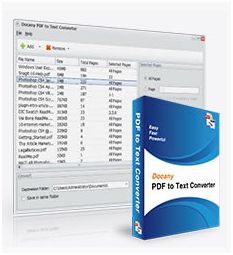
When you have a PDF file, you must have known that the files can’t be edited or reused as well. And the division into pages makes little sense for on-screen reading. Docany PDF to Text Converter, which is a utility program designed to extract text from PDF files so that it can be used in other applications. It can be used to add and convert multiple PDF files to text format at one time with only a few mouse clicks. With this easy-to-use application, you can easily edit, re-use, re-organize, present, and share your PDF files.
Docany PDF to Text Converter helps you convert PDF to text in just three steps. You don’t need to know more about PDF format or other settings, (1) just run the program, (2) import PDF files, and (3) click Start ~ then you can get your converted text.
Docany PDF to Text Converter is an efficient and convenient program to convert PDF to plain text in batch mode. With a few mouse clicks hundreds of PDF files will be converted to plain text files at one time. So you can easily edit, re-use, re-organize, present, and share your PDF files. Additionally, it doesn’t require Adobe Acrobat or any other PDF plugins to be installed.
- Extract the text from a PDF file, and retain its original structure and layout.
- Convert hundreds of PDF files at one time in batch mode. You can drag/drop files.
- Select certain pages of PDF to convert.
- Both amateur and professional users can deal with PDF files easily.
- Convert PDF to plain text, so you can edit and reuse your PDF content.
- Extract the text from a PDF file, and retain its original structure and layout.
- Normalizes the text in a PDF document to Unicode.
- Support multi-language PDF files to be converted.
- Support encrypted PDF files (Capable to convert password protected PDF files to text, it will ask for a password during importing PDF files).
- Select certain pages of PDF to convert (either select partial document or the entire document ~ its up to you)
What’s really nice about this program?
- You DO NOT need Adobe software or any other PDF plugins to be installed {it does not require Adobe Acrobat, or Acrobat Reader for installation}.
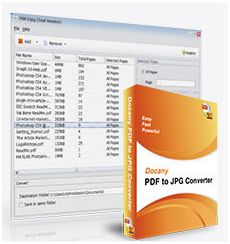
PDFs are a useful document format in the world: it’s well suitable for the storage and exchange of electronic documents. However, in some certain cases, the PDF file is not everyone’s choice, for its feature is that the restrictions of copying, pasting, re-using and so on. When you have got some PDF files and want to insert it into power point presentations, what will you do? Here you need to convert the PDF file to JPG images. The most efficient way to achieve this is by using Docany PDF to JPG converter, this program could convert each PDF page into a separate JPG file.
Docany PDF to JPG Converter is a windows utility for the conversion of PDF documents into JPG, TIFF, BMP, PNG or other graphical images. With this program you can convert PDF to JPG in batch at a time. What’s more, you can also specify the page range that you want to convert to JPG images, and set the output image resolution and quality.
Convert PDF to JPG or in other format images, such as BMP, PNG, TIFF (and more). With a few mouse clicks hundreds of PDF files will be converted to image files automatically. So you can easily edit, re-use, re-organize, present, and share your PDF files. Additionally, it doesn’t require Adobe Acrobat or any other PDF plugins to be installed.
- Convert PDF to JPG or in other format images, such as BMP, PNG, TIFF…
- Convert hundreds of PDF files at one time in batch mode.
- Select certain pages of PDF to convert.
- Convert PDF files with super high speed, support multi-core processing.
- Both amateur and professional users can deal with PDF files easily.
- Support encrypted PDF files (Capable to convert password protected PDF files to text, it will ask for a password during importing PDF files).
- Select certain pages of PDF to convert (either select partial document or the entire document ~ its up to you)
- Specify the page range that you want to convert to JPG images, and set the output image resolution and quality.
My Thoughts
For anyone that deals with PDF files, this software program is definitely one that I would recommend. There are many reasons why someone would need to have a PDF converter…here are just a few examples:
1) A person has created a newsletter/flyer and converted it into a PDF document. At the last moment, before preparing to hand out the document, a typo error is found. With a PDF converter, someone can create an editable file for making changes which are necessary to the document.
2) While creating a presentation about your company/project, you find an image you want to change on your PDF document. With the converter, you would be able to quickly and easily change whatever you need.
Many times after converting your files into PDF file format, you notice so many changes that you need to do. The necessity of converting a document from PDF to Text, or PDF to JPG arises when you need to add or delete some content or images.
3) Another BIG reason, for needing a PDF converter, is when you need to extract valuable data or information from a Portable Document Format file. A person can even insert the tables, columns or charts into Text/JPG file after the conversion. You can also change the hyperlinks and bookmarks, if necessary. In other words, a person can convert the data into Word format to completely change the formatting as desirable. This really came in handy for our Black Friday Ad sales that we shared with you back in November.
To learn more Docany Software, you can visit their website. The product sells for $29.90, but is currently on sale for $19.90.
Now for the give away…Docany Software would like to giveaway their PDF Converter software (the same product reviewed above) to TWENTY (20) Frugal Fabulous Finds readers! 

There are TWO mandatory things you must do:
1. Enter your name/email address in the giveaway form below (for each entry), so that I can contact you!
There are also several other OPTIONAL entries as well, including (but not limited to):
Liking this blog post via FB, tweeting, subscribing to our newsletter and more!
***Very Important: All of your entries MUST be entered into the giveaway form below, or they will not count towards winning!***
This giveaway will end Sunday, January 15th at midnight. The winners will be chosen via Rafflecopter.com and will be announced Monday, January 16th!! Good luck!

Post published by Melissa Roach, our Product Review & Giveaway Specialist.
Melissa is a Full Time Mom & Blogger HERE (please check out her blog!)
I received one or more of the products mentioned above for free. Regardless, I only recommend products or services I use personally and believe will be good for my readers.
If you cannot see the giveaway form below, please click here!
Leave a Reply