

In this digital age that we live in today, photos on the web that we share with friends and family could possibly be copied and republished without your permission. For this, adding a watermark is an important way to protect your images from unauthorized copying and use. This month I had the opportunity to work with PearlMountain’s Photo Watermark software program. A very simple and easy way to prevent your photos from being used by others.
PearlMountain Photo Watermark protects your photo’s copyright by adding image watermark, text watermark, and/or your personal logo to digital photos in batch mode. No matter how many photos you need to add watermark, PearlMountain Photo Watermark will help you batch watermark your photos with just a few clicks of the mouse.

What can PearlMountain Photo Watermark do?
Automatic, Fast, Easy to Use
- Watermark hundreds of photos at a time with just a few mouse clicks.
- Watermark photos with super high speed, support multi-core processing.
- Both amateur and professional photographers can deal with digital photos easily.
Watermark for Image Copyright Protection
- Add image watermark. Over 50+ image watermarks are included.
- Add text watermark to image, the font can be edited, and the edge, shadow effects can be added.
- Support adding tile watermark.
- Fully control the parameters of watermark such as position, size and rotation, etc.
Watermark Template – Save Your Time
- Include plenty of preset watermark templates.
- Save/Load watermark template.
RealTime Preview – What You See Is What You Get
- WYSIWYG Editor (What-You-See-Is-What-You-Get).
- Super high speed, preview the final photos in realtime.
Batch Conversion
- Watermark thousands of files at once in batch mode.
- Position and size of watermark adapt to different sizes of images automatically.
Output Images with Highest Quality
- Do not damage the accuracy and quality of original image.
- Retain Color Profile, EXIF, IPTC, GPS information.
Convert & Resize Image for Any Use
- Resizing image for any different use, such as for Web, e-mail, photo printing, Facebook, MySpace, mobile phone, etc.
- Convert between many different image file formats. Supports the most popular image formats: BMP, JPEG, TIFF, RAW, PNG, GIF, TGA, and PSD, and almost all image formats.
Adjust Image Effects in Batch
- Adjust image brightness, contrast and saturation in batch to make your images look more special.
- Shows preview of new image as the setting is adjusted.
- Provide some parameters adjustment for each format.
- Rotate images.
Time-Saving Profile
- Save operations that you usually use as profiles and bring convenience with you in the future.
How does PearlMountain Photo Watermark work?
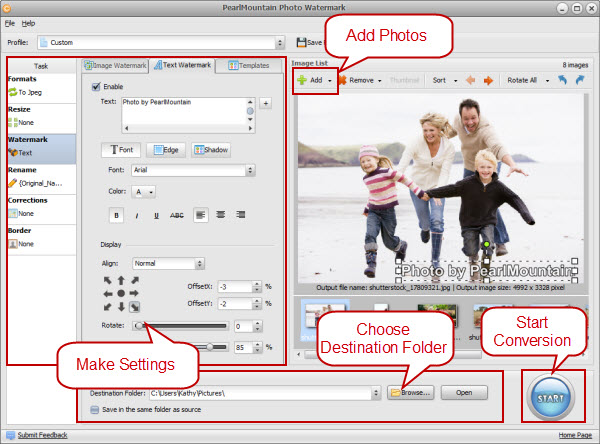
Launch the program. Add image files, make watermark settings, and press “Start” button. This is all you need to know to successfully use the program and get professional results.
What System Requirements do I need?
- Operation System: Microsoft® Windows 2000, 2003, XP, Vista (32 & 64 bit), Windows 7 (32 & 64 bit)
- Processor: 300 MHz processor or faster processor
- RAM: 256MB RAM (512MB or above recommended)
- Free Hard Disk: 5MB space for installation
My Review
I am always posting pictures to the internet, either to Facebook or various websites, and I have to say that this photo watermark software definitely gives me a wonderful peace of mind. It is incredibly easy to add any image watermark – including text or a personal logo that you create to any picture. You can also add a watermark to large selection of photos, making it fast and simple for any user. Plus, it can also help you add frames to photos, convert image format, resize photos, apply corrections and adjust effects, etc.
Here is a picture that I created for my personal blog…

I was able to edit my photo by re-sizing it, making it brighter, adding text (in any color, font, size and fading that I wanted) and more! For anyone who adds photos to the Internet – either just for fun, blogging or for a photography studio – this software program is definitely a MUST HAVE item that you need to utilize with every upload. You never know when someone will want to use your own personal or professional photos that you spent the time to take, edit and share with the world.
To learn more about Photo Watermark Software, be sure to visit their website.
Now for the give away…Pearl Mountain Software would like to giveaway a Photo Watermark software code (a value of $19.95 each) to 20 lucky winners! You will receive your code (which I currently have) as soon as you are notified as a winner!

There are TWO mandatory things you must do:
1. Enter your name/email address in the giveaway form below (for each entry), so that I can contact you!
There are also several other OPTIONAL entries as well, including (but not limited to):
Liking FFF on Facebook, liking this blog post via FB, tweeting and more!
***Very Important: All of your entries MUST be entered into the giveaway form below, or they will not count towards winning!***
This giveaway will end Sunday, March 25th at midnight. extended through Sunday, April 1st. The winners will be chosen via Rafflecopter.com and will be announced Monday, March 26th!! April 2nd! Good luck!

Post published by Melissa Roach, our Product Review & Giveaway Specialist.
Melissa is a Full Time Mom & Blogger HERE (please check out her blog!)
I received one or more of the products mentioned above for free. Regardless, I only recommend products or services I use personally and believe will be good for my readers.
If you cannot see the giveaway form below, please click here!
Leave a Reply