

The Easter bunny is on his way, and I have an amazing program to jump start your digital scrapbooks and photo collages! Picture Collage Maker Pro is an easy-to-use program which turns ordinary photos and pictures into stunning photo collages, scrapbook pages and cards to share with family and friends. And now they have a NEW assortment of Easter templates to choose from!
Picture Collage Maker Pro (priced at $39.90) is a fun and easy-to-use program for creating photo collages and digital scrapbooks from your digital photos to share with friends and family. With just a few clicks, you can create digital collages, scrapbooks, posters, invitations, calendars, and greeting cards.
What can Picture Collage Maker Pro do?
Photo Collages, Scrapbooks, Calendars, Greeting Cards, Posters, Photo Books and any other photo-related artwork that you can imagine! Plus, the Easter Edition contains 16 brand new stunning Easter templates. It allows people to make delightful Easter cards that they can freely share with families and friends. Some of the highlighted features include:
- Choose from 100+ collage templates
Picture Collage Maker comes with a library of professionally-drawn templates that offer you a wide variety of photo layouts and backgrounds for your collage. You have complete control over paper size and orientation.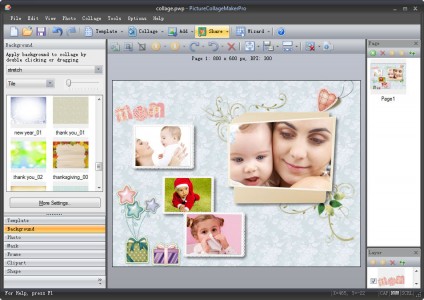
- Personalize your photo collage with your own digital photos
Select the folder that contains your photographs, and the program will show you a thumbnail of each image. Simply drag and drop pictures onto your background. It’s simple to resize each picture, move it to exactly where you want it, and tilt it a little or a lot, for added impact. - Personalize your creation by adding clip-art, text, and backgrounds
Personalize your creation by adding clip-art, text, and backgrounds. It allows you to resize, rotate and position all the elements to make collage crafting intuitive and fun. It’s easy to add text, in any color or size, anywhere on your collage. You can further personalize your creation by adding clipart, from team mascots and company logos, to holiday images. - Decorate your photo collage with frames and masks
Picture Collage Maker comes with a large collection of beautiful picture frames that you can add to any of your photos. In addition to traditional frames, the program also has masks that you can apply to each individual picture, allowing you to change the shape of each image.
- Print or email your collage direct to friends and family
You can save your project for future updating, save it as a jpeg file to send to your friends, or turn it into a template that you can use as the basis for future collages. You can even make your collage your Windows wallpaper.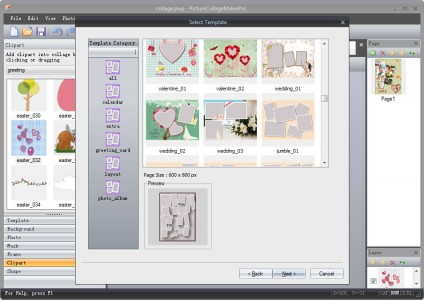
- Collage Wizard
As easy as it is to use Picture Collage Maker, the program makes it even easier. The Picture Collage Maker wizard takes you step-by-step through the process, making it ideal for younger children to use. - Calendars
Picture Collage Maker has a generous selection of features, each designed to assist you in creating custom calendars with ease and personality. You can make calendars for your family, office, club or church group that can include everything from pictures to logos to text, then print and share or keep on your active desktop. - Greeting Cards
With Picture Collage Maker, you can build a greeting card in seconds or spend more time creating keepsakes that your family and friends will treasure for years to come.No more stale holiday cards made of cardstock only—your greeting cards can be made with heart.
Try it FREE for 15 days
The trial version of Picture Collage Maker is provided for free so that you can get a first-hand feel for this fun and easy-to-use digital collaging tool. Creativity starts from here, click here to download Picture Collage Maker now.
My Review
For anyone who loves to create digital scrapbooks, or maybe you are interested in creating your own photocards or calendars – then this program is definitely one that you should consider trying out. Here is an Easter card I created:
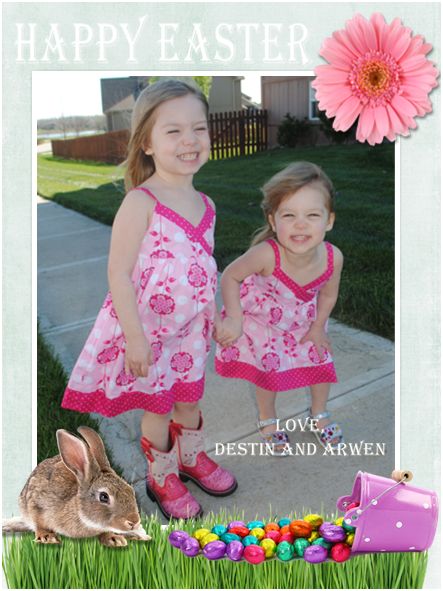
The program is very easy to use, and fun to play with! Whether you are creating a digital scrapbook page, a greeting card or a poster for your child’s school project – you will really enjoy using this program. I think what I liked best is that I could use my own clipart and my favorite photos – and put them anywhere I like 😀
This would definitely be a frugal way to save money on personalized photo gifts since you can print everything you create on your own printer! It only took me about ten minutes to create this one of kind card, and I was able to add text, photos, clipart and more! I just love this program and cannot wait to start creating more projects for my whole family to enjoy!
To learn more about Picture Collage Maker Pro, be sure to visit their website. To see the full assortment of Easter sample templates they just added ~ click here!
Now for the give away…Pearl Mountain Software would like to giveaway a Picture Collage Maker Pro software code to 20 lucky winners!

There are TWO mandatory things you must do:
1. Enter your name/email address in the giveaway form below (for each entry), so that I can contact you!
There are also several other OPTIONAL entries as well, including (but not limited to):
Liking FFF on Facebook, liking this blog post via FB, tweeting and more!
***Very Important: All of your entries MUST be entered into the giveaway form below, or they will not count towards winning!***
This giveaway will end Monday, April 2nd at midnight. The winners will be chosen via Rafflecopter.com and will be announced Tuesday, April 3rd!! Good luck!

Post published by Melissa Roach, our Product Review & Giveaway Specialist.
Melissa is a Full Time Mom & Blogger HERE (please check out her blog!)
I received one or more of the products mentioned above for free. Regardless, I only recommend products or services I use personally and believe will be good for my readers.
If you cannot see the giveaway form below, please click here!
Leave a Reply